

Back up your Spotify Liked Songs, with the date you liked each one
Spotify keeps no history of your Liked Songs. Playlistation keeps dated snapshots with the date you liked each song, to download as CSV or JSON.
Sign in with Spotify. The Free plan needs no card.
Your Liked Songs are a list you built over years, and Spotify keeps no copy of it: no history, no earlier version to go back to, and no way to get back the date you liked a song once it has left the list. Playlistation takes dated snapshots of your Liked Songs and your playlists, with the date you liked each track, on every plan, and lets you download any snapshot as CSV or JSON.
How it works
- Sign in with Spotify. There is no Playlistation password, and free and Premium Spotify accounts both work.
- Let it take snapshots. The first one is taken right after you sign in, then every week on Free, every day on Plus and every hour on Pro. A run on which nothing changed writes nothing.
- Download what you need. Open Export on any snapshot and pick Download CSV or Download JSON. The file is yours to keep.
The reference for all of it is library backups.
What Spotify cannot give you back
A lost track is not really lost: you can search for it by name and like it again. What is lost is the date you saved it, and with it the order of your library. That order is what years of liking amount to, and nobody rebuilds it from memory.
Spotify does not keep it for you. Its own moderators have said as much on the community forum: the "Date added" attribute cannot be restored, for technical reasons on their side. The feature request asking for it has been open for over a year without moving.
So the thing worth keeping is the record: which tracks you had, and when you liked each one. That is what a snapshot holds, and what every export carries.
What a snapshot holds
| What | In a snapshot |
|---|---|
| Liked Songs | Every track, with the date you liked it |
| Your playlists | Name, description, public or private, and the tracks in each |
| Podcasts, episodes and audiobooks | No |
| The audio itself | No: a snapshot is a list of tracks, not a copy of the music |
A snapshot stores Spotify ids, so a library of fifty thousand tracks is still a small file; the titles, artists and albums are filled in when you export one.
What the export contains
The CSV has one row per liked track, with the columns spotifyId, title, artists, album, spotifyUrl and likedAt, the date and time you liked it. Open it in a spreadsheet and sort by likedAt to read your library in the order you built it. The JSON holds the same fields for every liked track, plus your playlists with their name, description, visibility, Spotify link and the ids of their tracks.
A track Playlistation has no title for still gets its row, with its id and its Spotify link, which is enough to find it again.
Why the history keeps up on its own
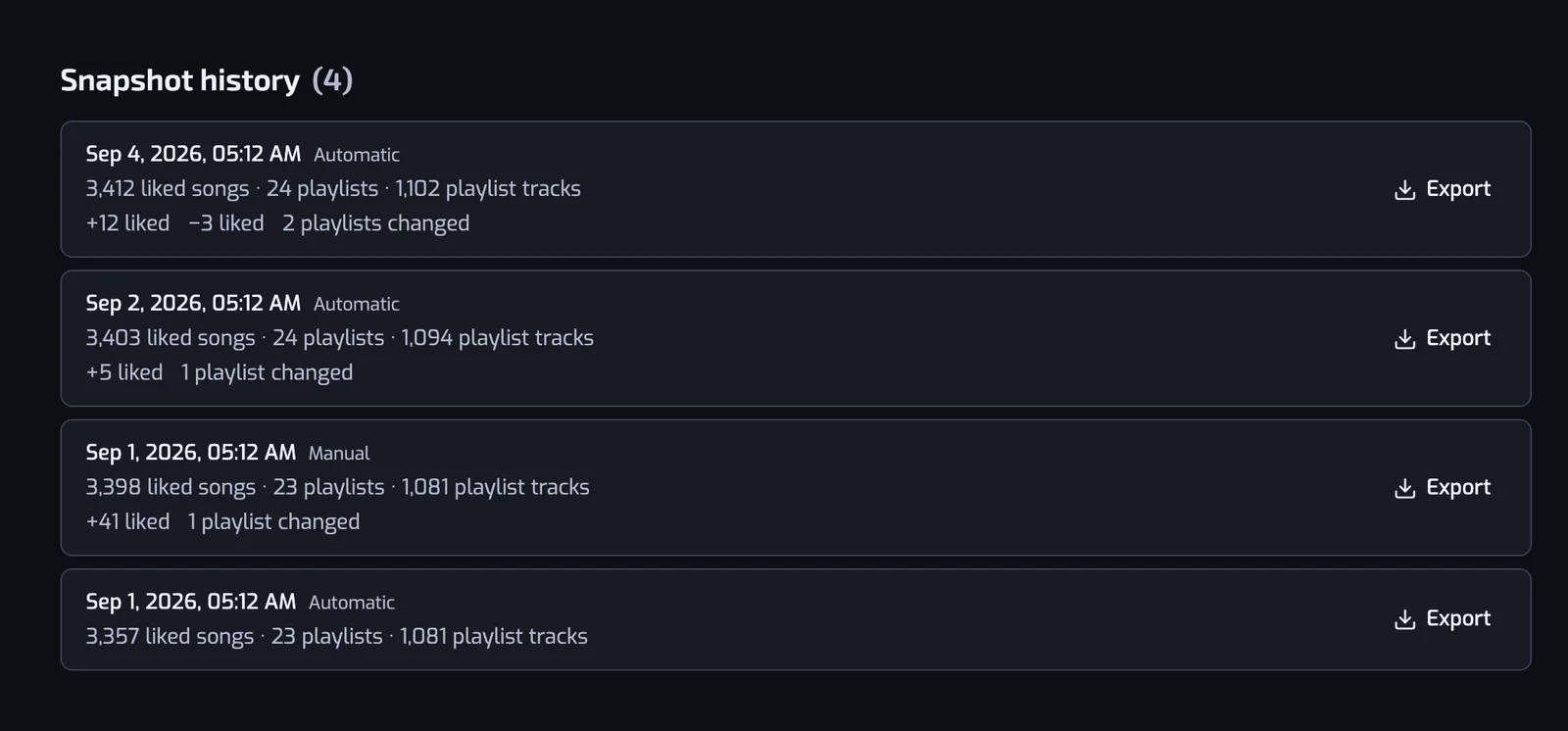
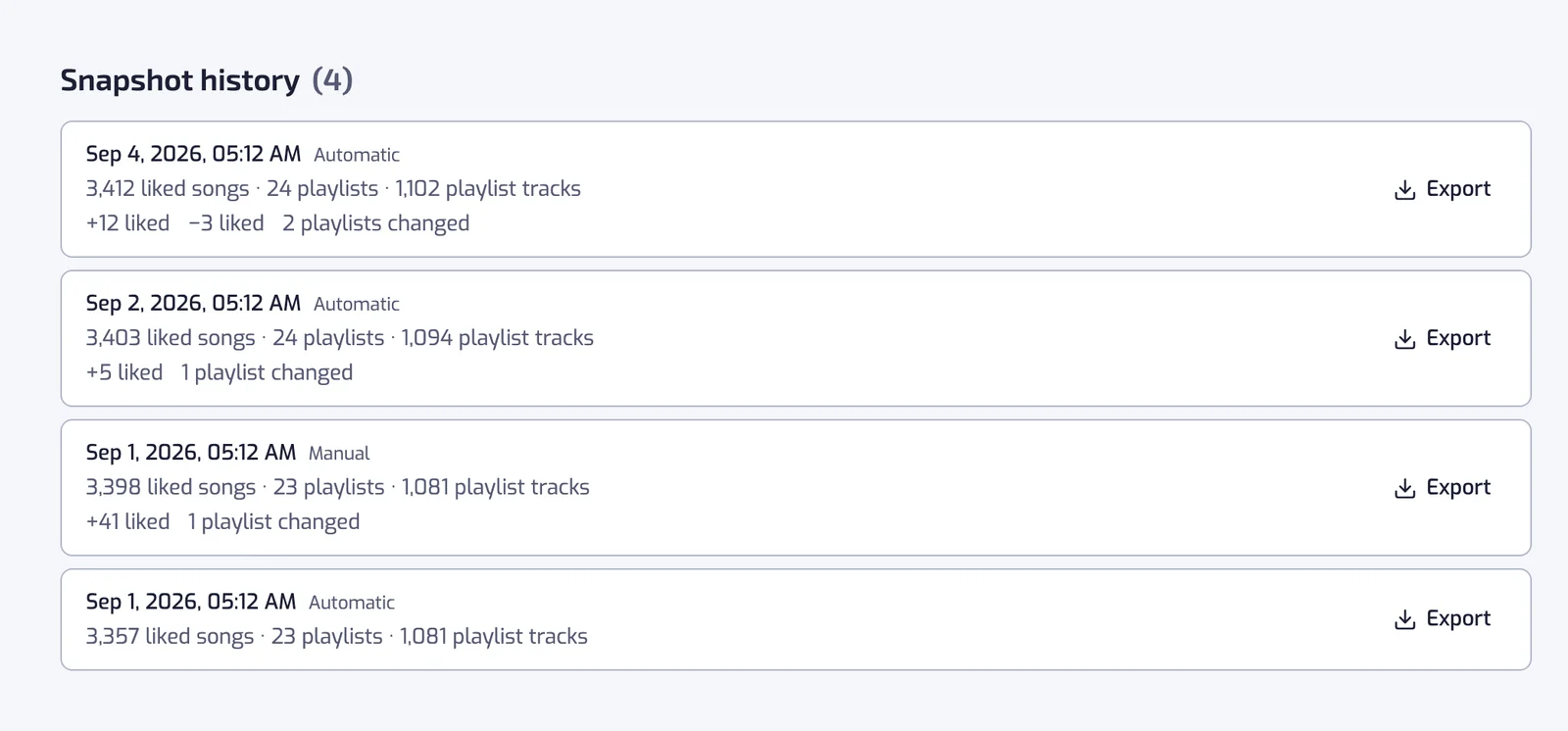
The backup runs on its own, on every plan: every week on Free, every day on Plus, every hour on Pro. A run that finds you liked nothing and changed no playlist writes no new snapshot: the one you already have is marked as still accurate. The history is therefore a list of the moments your library actually changed, each row saying how many tracks came in and went out and how many playlists changed since the row below it.
Older snapshots are thinned out the way a backup drive does it: the newest of each hour, day, week and month is kept, up to a count set by the plan. Free keeps 4 weekly snapshots, Plus a week of daily ones, a month of weekly ones and a year of monthly ones, and Pro keeps one a month forever. Each snapshot also shows in the app's History timeline, where you can download it.
What it will not do
- It does not put tracks back into Spotify. A snapshot is a record. Playlistation does not like tracks again or recreate playlists from it; it does not even ask Spotify for the permission that changes your Liked Songs. The export tells you which tracks to look for.
- It cannot change the dates Spotify shows. A track you like again in Spotify gets that day's date there. The original date stays in your snapshots and your exports.
- It cannot bring back a track Spotify has removed from its catalog. The export still lists it by id and link, but nobody can like a track that no longer exists.
- Free backups pause when you stay away. After 60 days without opening Playlistation, a Free account is no longer backed up; the snapshots it has are kept, and the next visit starts a new one.
What each plan gets
| Free | Plus | Pro | |
|---|---|---|---|
| Backed up | Every week | Every day | Every hour |
| Back up now | No | No | Yes |
| Snapshots kept | 4 weekly | 7 daily, 4 weekly, 12 monthly | 24 hourly, 30 daily, 12 weekly, every monthly one forever |
| Reaches back | About a month | About a year | To your first snapshot |
| CSV and JSON export | Yes | Yes | Yes |
Export is on every plan on purpose: a backup you cannot download is not really yours. An account that moves to a smaller plan keeps its snapshots listed and can still export them; at the next backup they are thinned to the new plan's counts. The full comparison is on plans and billing.
The dates in a snapshot are the same ones the Liked date filter reads, and organizing your Liked Songs is what the rest of the app is for.
Questions about backing up Spotify Liked Songs
Does Spotify back up your Liked Songs?
No. Spotify keeps no history of your library and no way to roll it back to an earlier day. If tracks leave your Liked Songs, whether you removed them or something else did, Spotify has no record of what was there or when you liked it. That is the gap a separate, dated record fills.
Can Spotify restore the date I liked a song?
No. Spotify's own moderators have said on the community forum that the "Date added" attribute cannot be restored, for technical reasons, and the feature request asking for it is still open. Playlistation cannot set those dates either. What it does is keep them: every snapshot and every export has the date you liked each track.
How do I export my Spotify Liked Songs to a spreadsheet?
Open Export on a snapshot and choose Download CSV: one row per liked track with its title, its artists, its album, its Spotify link and the date you liked it. JSON is the other format, and it includes your playlists as well. Both are open on every plan.
Can Playlistation put my Liked Songs back?
No. It does not write to your Liked Songs at all, and it does not ask Spotify for the permission that would let it. A snapshot is a record you can download and read: it tells you which tracks you had and when you liked each one, and you like them again in Spotify yourself.
Do I need a paid plan to back up my Liked Songs?
No. Every account is backed up right after sign-up and then every week on the Free plan, which keeps 4 weekly snapshots, and exporting them as CSV or JSON is free too. Plus backs up every day and reaches back a year; Pro backs up every hour, adds Back up now and keeps one snapshot a month forever.