

Account
Devices
Every time you sign in, Playlistation records that as a session: one device, one sign-in. Devices lists them all, so you can see where your account is open and sign out of anywhere you no longer use.
Where it is
Open Settings and stay on the Account section. Devices is the row right under Current plan.
What a row tells you
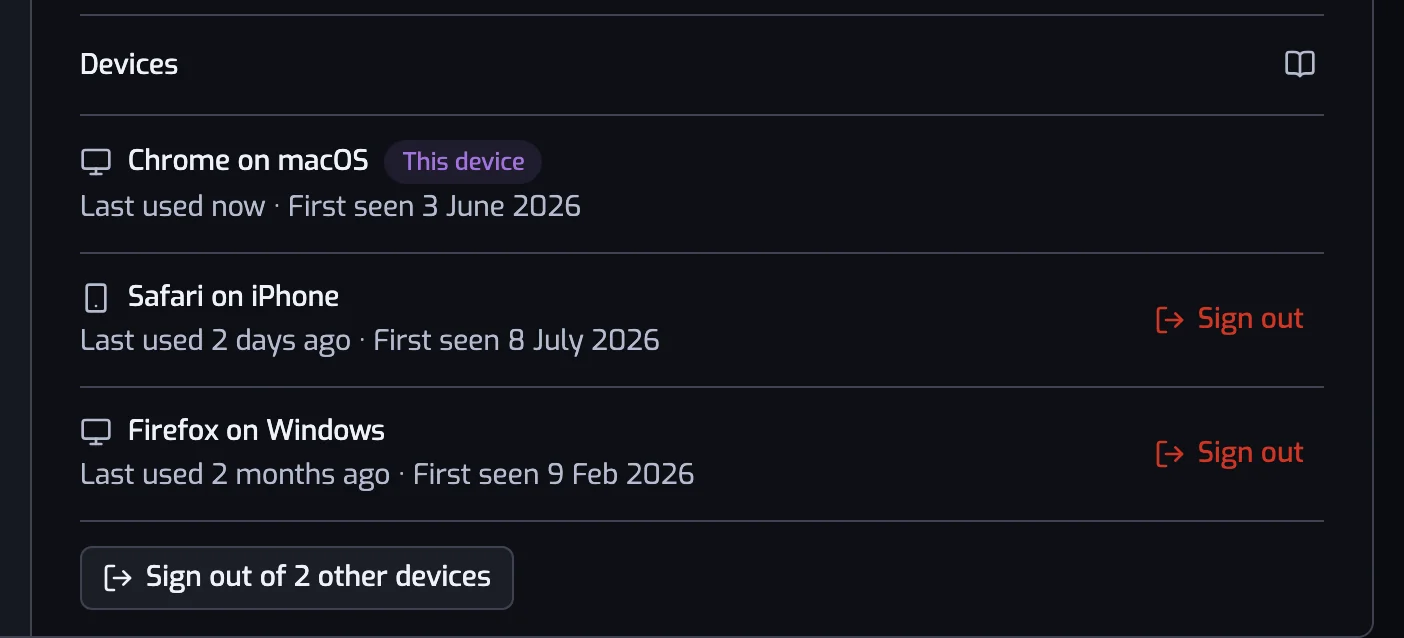
Each row is one device:
- The name, worked out from the browser that signed in, such as "Chrome on macOS" or "Safari on iPhone". It is a best guess from what the browser says about itself, not a fingerprint: two profiles in the same browser look the same, and a browser that hides what it is (Brave, for instance) is named after the engine it reports. A device that never said gets Unknown device.
- Last used, how long ago that device last made a request. This is the useful column: a device you have not touched in months is the one to question.
- First seen, the day that session was created, which is the day you signed in on that device.
- This device, on the one you are reading the list from. There is exactly one.
The list is ordered by Last used, most recent first, so your current device leads and the stale ones sink.
Signing out of a device
Sign out on any row ends that session immediately: the next request from that device is refused and it lands back on the sign-in page. Nothing else about your account changes: your playlists keep updating, and the other devices stay signed in.
Sign out of N other devices, under the list, does the same to every device except this one. It is the button to use if you have signed in somewhere you no longer control.
Your own row has no Sign out button on purpose: Log out, next to your account at the top of the pane, is the one that signs out the device you are on, and it says so.


When a session ends on its own
Two limits end a session without you doing anything. It expires after 30 days without a single request, which keeps this list to the devices you still use. It also expires 75 days after it was created, however much you use that device. In both cases the next request from that device is refused and the row leaves the list.
The 75-day limit is there because a session must not outlive the Spotify authorization it came from, and Spotify ends that authorization after six months. Nothing renews by hand and there is no "stay signed in" box: when a session runs out, the app sends you to Spotify and straight back. If that browser is still signed in to Spotify you see no screen at all, and you land back where you were with a new session and six more months. See Staying connected to Spotify.
Signing out on one device does not affect the others, and neither does signing in again on a device that already has a session: that creates a new session next to the old one. If you see two rows for what looks like the same browser, that is why. Last used is what separates them (the one you are on is badged This device and leads the list), and signing out of a staler one is safe.
What a session is not
The session token is a random string with no meaning in it: it says nothing about you, and it is never shown to you or sent back to your browser by this page. Signing a device out revokes it on the server, so a copy of it is worthless from that moment on.
Deleting your account revokes every session at once. Disconnecting Playlistation from Spotify's own Manage apps page does not sign you out: your playlists stop updating and the app asks you to reconnect Spotify, but every device in this list stays as it is. Security and privacy covers what is stored and for how long.