

Help
Troubleshooting
What you see, then the cause and the fix. Statuses are explained in How syncing works; plan limits are on Plans and billing.
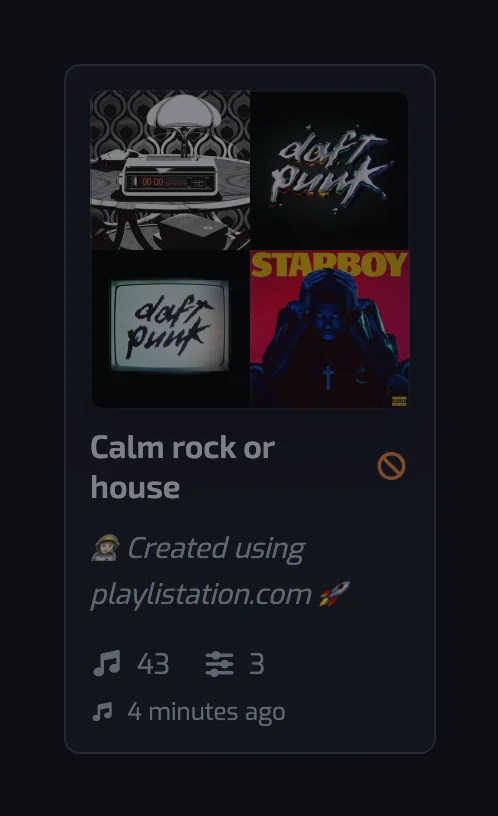
A playlist is dimmed with an orange icon
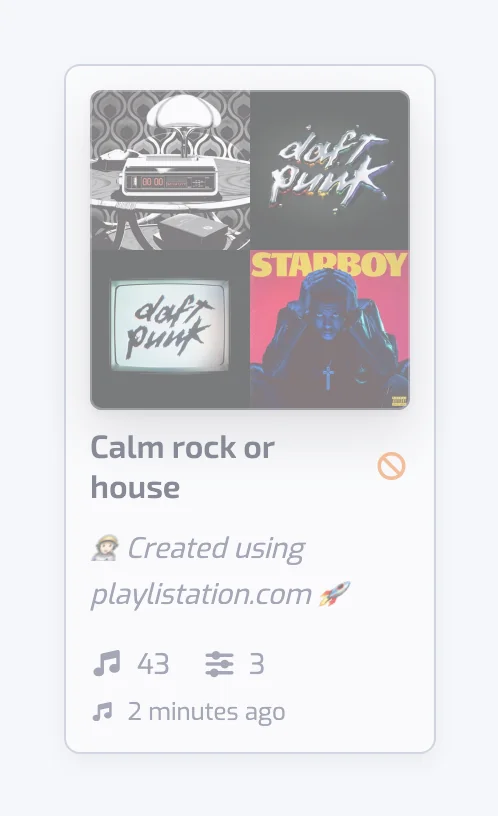
The card is dimmed, with an orange "not updating" icon (a circle with a slash) next to the name: the playlist is not being updated.
You cannot open it. The playlist is over the Free plan's quota of 5, usually after a paid plan ended. Playlistation keeps the oldest playlists active up to the limit and disables the rest. Delete a playlist you no longer need, or upgrade; disabled ones come back as soon as a slot is free.
You can open it. The playlist is parked for something only you can clear: a filter holds a value Playlistation cannot evaluate, or your Spotify connection is gone (next section). Open the playlist and edit it, a filter or even its name: there is no save button, every edit is saved at once and puts it back into the update rotation.
The app asks me to reconnect Spotify and my playlists stopped updating
Spotify refused Playlistation's access to your account: you removed Playlistation from your Spotify apps, changed your Spotify password, or the six months Spotify gives an app ran out. Only you can restore it, so Playlistation stops using the connection and parks your active playlists in Error.
You stay signed in to Playlistation. A dialog you cannot close takes over the app: Reconnect your Spotify account, saying your playlists are paused until you do, with a single Reconnect Spotify button. Click it. It sends you to Spotify and back, reactivates your parked playlists, queues an update for each, and tells you how many are syncing again. If you removed Playlistation from Spotify's "Manage apps", accept the consent screen again. If one playlist stays parked, open it and edit it once.
If your Playlistation session had run out on its own in the meantime, you land on the sign-in page instead. Signing in with Spotify does the same thing.
The app warns you before this happens. Over the last 90 days a banner sits at the top of every page with a Reconnect Spotify button, the Spotify section under Account in Settings gives the date and the same button, and reminder emails go out about a month and about a week ahead, with one more if the connection has already stopped. Staying connected to Spotify shows what each of them looks like.
A song I liked is not in my playlist
Open the playlist and find the track under the Excluded tab of the track list (the search box matches its title, artist or album). Click its row: each filter shows the value it read for the track, with a green check or a red cross. The usual causes:
- It has not synced yet. A like reaches a playlist at its next refresh: once a day on the Free plan, every hour on Plus and in under 30 minutes on Pro. On Pro, Sync now on the Playlists page rebuilds every playlist right away; see Sync now.
- It is older than your plan monitors. On Free and Plus, only your most recent likes are read: 1,000 on Free, 3,000 on Plus. Pro reads your whole library. The Playlists page warns you when your library is larger than your plan's limit.
- The playlist is full. Spotify playlists cannot hold more than 10,000 tracks. When more match, the most recently liked ones are kept and the playlist page says how many were left out. Tighten the filters or split it.
- Spotify has no audio analysis for it. Tempo, Energy, Danceability, Positiveness, Acousticness, Instrumentalness, Liveness and Speechiness read Spotify's audio features; a track without them never matches these filters.
- Its language is not detected yet. Until it is, a track matches neither an Any of nor a None of Language filter; the playlist updates on its own once the language arrives. An instrumental is not in that case: it has the "- No lyrics -" language. See Language.
- Its artists have no genre. Spotify tags genres on artists, not tracks. When no artist carries a genre, an Artist genre filter cannot match.
- It is a local file. Spotify does not let apps add local files to a playlist; see Local files and podcasts.
Tracks I added by hand disappear
A smart playlist's tracks are rewritten at every update to exactly the set that matches its filters. Anything added in Spotify is removed at the next update, except a local file, and duplicates are collapsed to one copy. Keep hand-picked tracks in a regular Spotify playlist, or widen the filters.
I renamed the playlist in Spotify and the name came back
A name changed in Spotify is kept until you edit the playlist in Playlistation, which sends the app's name and description to Spotify again. Rename it in the app instead. See Edits made in Spotify.
The playlist says Syncing or Waiting for first sync for a long time
Waiting for first sync means the first run is queued; Update queued means a filter edit has queued a run that has not started yet. First sync…, Syncing… and the step names (Reading songs… through Updating Spotify…) mean it is running, and the page updates live, with how far the step has got when it can be counted. Playlists are updated in turns, so one can wait up to your plan's interval before its next run, and a temporary Spotify failure is retried. Well past your interval, edit one of its filters to queue a fresh run (a rename does not start one). In the installed app, pull down from the top of the page to reload it.
I deleted the playlist in Spotify
Playlistation notices at the next update, or during a nightly check, and archives it: it disappears from your Playlists page and stops counting toward your quota. If you edit it in Playlistation before then, saving creates it again on Spotify, with a new link, and a message tells you so. To remove a playlist cleanly, click the trash icon (Delete) on its page in the app and choose Remove from Playlistation or Delete everywhere; see Deleting a playlist.
The language of a track is wrong
Spotify provides no language, so an AI model detects it from the track's title, artists and album, without hearing the audio or reading the lyrics. When the model stays unsure after three tries, the track borrows its main artist's usual language until a confident detection replaces it, which is wrong for an artist who sings in several languages. In the track list, click the flag icon on the track's Language line, Report an incorrect language, and send the right one. The AI model checks each report and applies it when it finds the language you sent likely; the ones it doubts wait for a person to review them.
A banner says my browser is translating the page
Your browser is machine-translating the app, with Chrome's built-in translation for instance. A translated page can break parts of the app: a list or a dialog can stop updating and send you to an error page, so the app offers its own translation instead.
The browser is translating into one of the app's languages, so the banner is written in that language and its button switches the app to it, like Language in Settings.
Close the banner with × to hide it for that language on this device. Nothing is shown for a language the app does not offer, nor in Edge, which does not say which language it translates into.
Local files and podcasts
Playlistation reads only your Liked Songs, so saved podcast episodes are never read. A local file in your Liked Songs has no Spotify artist behind it: artist and genre filters cannot match it, and the library stats skip its artists. A local file you add to a smart playlist in Spotify stays there: Spotify does not let apps remove a local file by its ID like other tracks, only by its position in the playlist, and the sync leaves it where you put it while it updates the rest of the playlist. Spotify does not let apps add local files either, so a local file in your Liked Songs is never added to a smart playlist, even when it matches the filters.
Common questions
Why is my smart playlist not updating?
The usual causes are a dimmed playlist with an orange icon (over the Free plan's 5 playlists, or parked after an error), a lost Spotify connection that the app asks you to reconnect, or simply waiting its turn: once a day on Free, every hour on Plus, in under 30 minutes on Pro. Each case is described above, and editing any filter queues a fresh run.
Why do some of my tracks have no tempo or energy?
Tempo, Energy and the other audio values come from Spotify's audio analysis, and Spotify has none for some tracks. Playlistation cannot fill the gap, so such a track never matches an audio filter. It still matches filters that read other data, such as Artist, Release date or Liked date.
Why is a song I unliked still in my playlist?
Playlistation has not caught up yet. Each playlist drops the song at its next refresh: once a day on Free, every hour on Plus, in under 30 minutes on Pro. The song leaves at that update without anything from you.
Still stuck? Write to us through the in-app chat or the portal described in Giving feedback, with the playlist name and what you expected.